Product overview
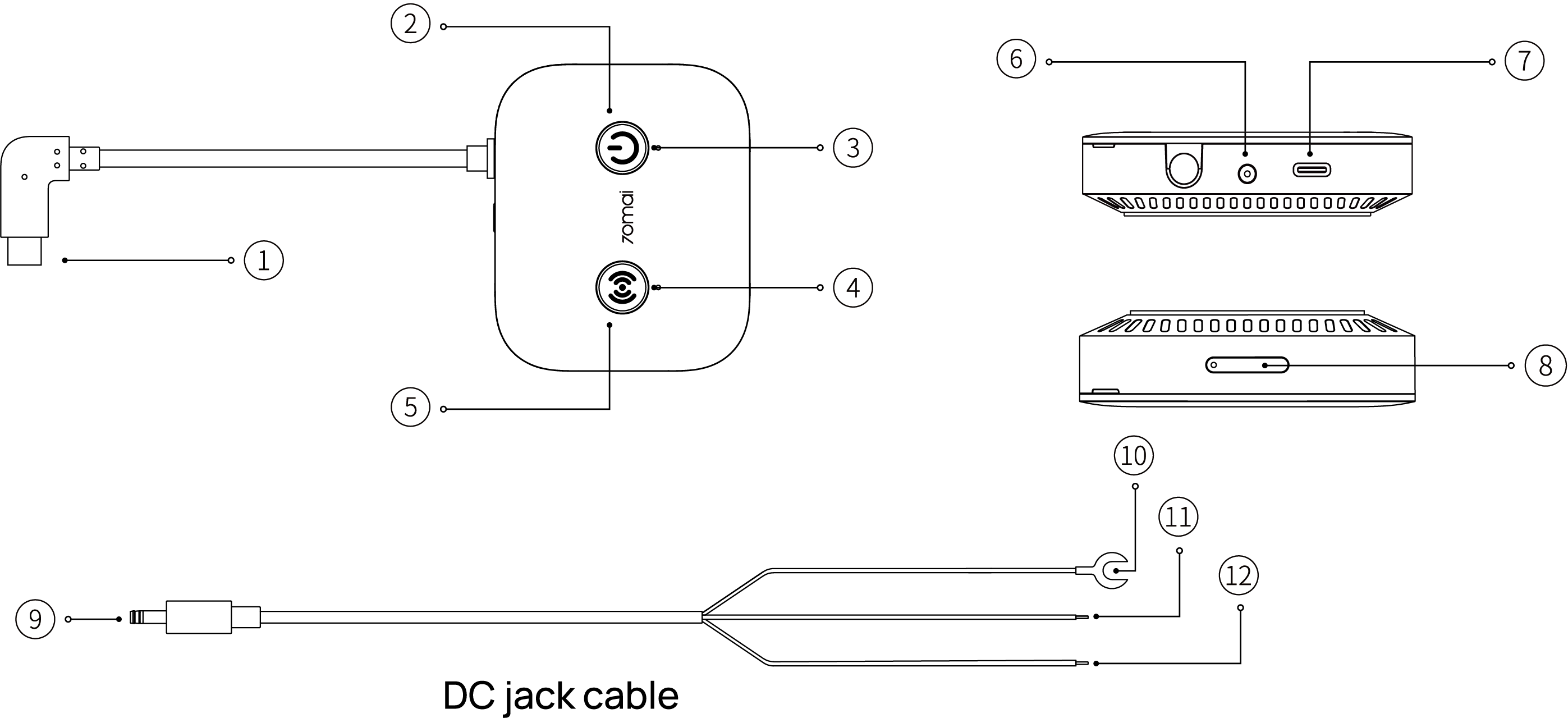
- Dash cam connector
- Power button
- Power indicator light
- Wi-Fi indicator light
- Wi-Fi button
- DC jack port
- Type-C port*
- SIM card tray
- DC jack plug
- Ground wire (Black)
- ACC signal wire (Yellow)
- Power wire (Red)
*Only for a 70mai car charger.
Button function
Power button: With the hardwire kit connected to power, press to turn the hardwire kit on/off.
Wi-Fi button: With the hardwire kit connected to power, press to turn the Wi-Fi hotspot of the hardwire kit on/off.
Indicator description
Power indicator light
- Solid green: Connected to network
- Solid blue: Upgrading the firmware
- Blinking blue: Having a connection problem with 70mai server
- Blinking red: The SIM card is malfunctioning
- Alternately blinking blue and red: No 4G coverage detected
Wi-Fi indicator light
- Solid green: The Wi-Fi hotspot is up and running
- Blinking blue: Booting up the Wi-Fi hotspot
- Off: Wi-Fi hotspot turning off
Specifications
Product: 70mai 4G Hardwire Kit
Model: Midrive UP11/UP12
Input: DC 12V to 30V/5V
Output: 5V/2.4A
Negative car power outlet: GND(-)
Positive car power outlet: VCC(+)
Car power: ACC
LTE: Band B2/B4/B5/B12/B13/B14/B66/B71 (Appilcable only to Midrive UP12)
LTE: Band1 3 5 7 8 20 28 38 40 41(Appilcable only to Midrive UP11)
Note: Illustrations of the product, accessories, and user interface in the user manual are for reference purposes only. The actual product and functions may vary due to product enhancements.